- Jan 22, 2026
AI That Asks Questions: Implementing the Agent Await Prompt Pattern
- Teddy Kim
- 0 comments
Your AI agent is setting up a project. It needs a name. What does it do?
Option one: guess. Call it "Untitled Project 47" and hope the user fixes it later. This is hallucination with extra steps.
Option two: ask everything upfront. Force the user through a 10-field form before the AI does anything useful. This is 1997 web design with an AI prefix.
Option three: ask mid-stream. Start working, then pause to ask only what's needed, exactly when it's needed.
Option three feels most natural. It's how humans work. But it's technically hard. You need to pause a stream, wait for input, then resume exactly where you left off without memory leaks, race conditions, or weird state inconsistencies.
This is the Agent Await Prompt pattern. And if you're building AI features in React, you need to understand it.
The Problem: Modal Hell
If you've built traditional web forms, your instinct is probably to pop up a modal when you need user input. The AI starts streaming, realizes it needs information, and boom, modal overlay. The user fills out the form, clicks submit, and the stream continues.
This breaks the flow.
The user loses context. They forget where they were in the conversation. The modal interrupts their train of thought. And if you're streaming a long response, popping up a modal feels jarring, like someone hitting pause on a movie to ask what you want for dinner.
The Agent Await Prompt pattern keeps everything inline. The input field appears right where the AI paused. The user sees why the AI is asking. They fill it in. The stream picks up exactly where it left off.
No modals. No context switching. Just a conversation that pauses when it needs to.
The Stream Contract: Five Event Types
The pattern uses five event types to control the pause/resume lifecycle:
text is for normal streaming content. The AI is talking.
await_input means the AI needs something from you. The stream pauses here.
input_submission is when you provide the data. This event is generated by your client code, not the server. It's yielded by the generator for observability, so it shows up in your Network Inspector and logs, but it represents a client action.
resume is confirmation that the stream is continuing with the data you submitted.
timeout means the user walked away. The stream continues with fallback behavior or ends, depending on configuration.
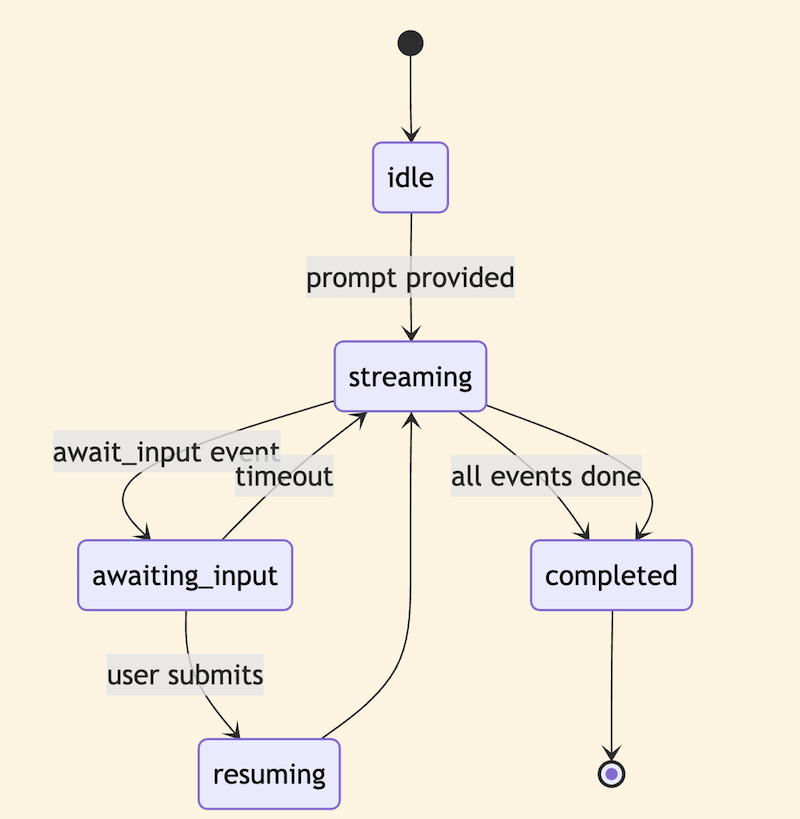
These events drive a state machine with six states: idle, streaming, awaiting_input, resuming, streaming again, and completed. Clear transitions. Your component renders based on this state, not by trying to infer what's happening from other variables.
The Pause Mechanism: Promises as Control Flow
The magic happens in the stream controller. When the generator yields an await_input event, it then awaits a promise. That promise is stored in the controller. Your UI code, the submit button handler, calls submitInput, which resolves that promise. The generator wakes up and continues.
class StreamController {
  private resolveInput: ((data: InputData) => void) | null = null;

  // Called by the stream generator to pause
  waitForInput(timeoutMs: number): Promise of InputData {
    return new Promise((resolve, reject) => {
      this.resolveInput = resolve;

      // Set up timeout
      setTimeout(() => {
        reject(new StreamError('Input timeout', 'timeout'));
      }, timeoutMs);
    });
  }

  // Called by the UI when user submits
  submitInput(data: InputData): void {
    if (this.resolveInput) {
      this.resolveInput(data);
    }
  }
}
The StreamController class has a private resolveInput property that starts as null. The waitForInput method returns a Promise. Inside that promise, it stores the resolve function in resolveInput, then sets up a timeout that will reject with an error if time runs out.
The submitInput method checks if resolveInput exists, and if so, calls it with the data. This resolves the promise and lets the generator continue.
The async generator awaits on this controller. It yields text events, then yields an await_input event, then waits for the controller's waitForInput method. When that resolves, it yields a resume event and continues streaming.
Think of it like a callback, but inverted. The generator is waiting. The UI is in control. When you're ready, you tell the generator to continue. This decouples the stream logic from the UI completely.
The React Hook: Bridging Async to State
The useAwaitPromptStream hook bridges async stream events to React state. It maintains state for text, streamState, inputFields, inputMessage, and timeoutRemaining.
function useAwaitPromptStream(prompt: string, options?: StreamOptions) {
  const [text, setText] = useState('');
  const [streamState, setStreamState] = useState('idle');
  const [inputFields, setInputFields] = useState(null);
  const [inputMessage, setInputMessage] = useState('');
  const [timeoutRemaining, setTimeoutRemaining] = useState(null);

  useEffect(() => {
    const controller = new StreamController();
    const abortController = new AbortController();
    setStreamState('streaming');

    async function consume() {
      const stream = createStream({ prompt, ...options }, controller);

      for await (const event of stream) {
        if (abortController.signal.aborted) return;

        switch (event.type) {
          case 'text':
            setText(prev => prev + event.data.text);
            break;
          case 'await_input':
            setStreamState('awaiting_input');
            setInputFields(event.data.fields);
            setInputMessage(event.data.message);
            startCountdown(event.data.timeoutMs ?? 60000);
            break;
          case 'resume':
            setStreamState('resuming');
            setInputFields(null);
            break;
        }
      }

      setStreamState('completed');
    }

    consume();
    return () => {
      controller.cancel();  // Cancel pending input wait
      abortController.abort();  // Stop state updates
      clearInterval(countdownInterval);  // Clear timeout countdown
    };
  }, [prompt, options]);

  const submitInput = useCallback((data) => {
    controller.submitInput(data);
  }, []);

  return {
    text,
    streamState,
    inputFields,
    inputMessage,
    submitInput,
    timeoutRemaining
  };
}
Inside a useEffect, it creates a StreamController and an AbortController. It defines an async consume function that iterates over the stream. For each event, it updates the appropriate state: text events append to the text state, await_input events set the streamState to awaiting_input and populate the input fields, resume events clear the input fields and set streamState to resuming.
The cleanup function cancels the controller, aborts the AbortController, and clears any countdown interval.
The hook returns all the state values plus a submitInput function that delegates to the controller.
The critical detail is cleanup. If the component unmounts while awaiting input, you have a dangling promise and probably an interval running for the countdown. Always clean up.
The UI: Inline Input Fields
With the hook in place, rendering is straightforward.
function AgentAwaitPromptDemo() {
  const {
    text,
    streamState,
    inputFields,
    inputMessage,
    submitInput,
    timeoutRemaining
  } = useAwaitPromptStream('Set up a new project');

  return (
    React.createElement('div', { className: 'message-bubble' },
      React.createElement('p', null, text),
      streamState === 'awaiting_input' && inputFields && (
        React.createElement(InlineInputFields, {
          fields: inputFields,
          message: inputMessage,
          onSubmit: submitInput,
          timeoutRemaining: timeoutRemaining
        })
      )
    )
  );
}
Your component calls useAwaitPromptStream with a prompt. It renders the accumulated text. When streamState equals awaiting_input and inputFields exists, it renders an InlineInputFields component with the fields, message, onSubmit handler, and timeout remaining.
The input form appears embedded in the conversation, not in a modal. This maintains context. The user sees where they are in the conversation and why the AI is asking.
Each field includes metadata for rendering: name (the key in submitted data), type (text, number, date, email, or url), label, required flag, placeholder, helpText, and defaultValue.
interface InputField {
  name: string;           // Key in submitted data
  type: InputFieldType;   // 'text' | 'number' | 'date' | 'email' | 'url'
  label: string;          // "Project Name"
  required: boolean;      // Show asterisk, enforce before submit
  placeholder?: string;   // "e.g., Mobile App Redesign"
  helpText?: string;      // "A descriptive name for your project"
  defaultValue?: string | number;  // Pre-fill value
}
The UI component maps these to appropriate HTML inputs with validation. Don't let the stream resume with invalid data. Validate required fields on the client before calling submitInput. Show errors inline. Only resume when the data is actually valid.
Timeout is a Feature, Not an Edge Case
What if the user walks away? The timeout handler kicks in.
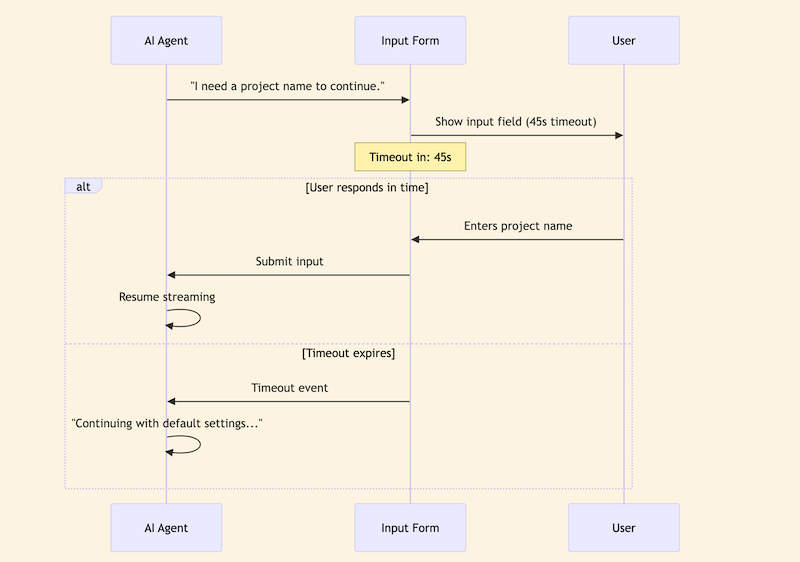
The resumeOnTimeout option controls what happens when time runs out. If true, the stream continues with fallback behavior. The AI might say "I'll use default settings since you didn't respond." If false, the stream ends.
The flow works like this: The AI asks for input, the UI shows the form with a countdown, and then either the user submits in time and the AI resumes, or the timeout expires and the AI continues with defaults or ends.
Design this path explicitly. What should happen if the user doesn't respond? That's not an edge case. It's a feature. The countdown creates urgency. The fallback provides continuity.
Production Gotchas
Three things will bite you if you're not careful:
1. Race conditions. What if the user submits input at the exact moment the timeout fires? Who wins?
// In StreamController
submitInput(data: InputData): void {
  if (this.resolveInput) {  // Check if still waiting
    this.resolveInput(data);
    this.cleanup();  // Clear timeout, nullify resolver
  }
  // If resolveInput is null, timeout already won - do nothing
}
The controller needs to handle this. When submitInput is called, check if we're still waiting. If resolveInput is null, the timeout already won. Do nothing. If it's not null, resolve the promise and immediately clean up so the timeout handler becomes a no-op.
2. Memory leaks. If the component unmounts while awaiting input, you've got a dangling promise and probably an interval running for the countdown.
useEffect(() => {
  // ... stream consumption ...

  return () => {
    controller.cancel();  // Cancel pending input wait
    clearInterval(countdownInterval);  // Clear timeout countdown
  };
}, [prompt]);
Always clean up in the useEffect return function. Cancel the controller and clear the countdown interval.
3. Client-generated events. The input_submission event is generated by the client, not the server. You yield it from the generator for observability, so it shows up in your Network Inspector, your logs, but it represents a client action. Don't expect to receive it from an API.
When to Use This Pattern
The Agent Await Prompt pattern works well for any task where the AI needs information it can't reasonably guess:
For Project Setup, you can't create without a name, so you need name, budget, and deadline.
For Sprint Planning, you need parameters to calculate, like duration, velocity, and start date.
For Data Collection with progressive disclosure, you need one piece at a time.
For a Configuration Wizard with context-dependent options, the input depends on previous answers.
For a Booking Flow, you need specifics to search like dates and preferences.
Don't use it when you can infer from context, when the AI can use reasonable defaults, or when asking would slow down something the user wants done fast. If someone says "summarize this document," don't pause to ask "how long should the summary be?" Just pick a reasonable length.
Try It
The full implementation is available at streamingpatterns.com. The Agent Await Prompt demo shows the full flow: streaming, pausing, filling in the form, resuming. You can see the timeout countdown, the state machine transitions, and the Network Inspector capturing every event.
Clone the repo and run npm run dev to dig into the implementation. The pattern directory includes hooks.ts with the useAwaitPromptStream hook and cleanup logic, mockStream.ts with the AsyncGenerator implementation and pause mechanism, AgentAwaitPromptDemo.tsx with the full demo component and inline input fields, and StreamController.ts with the promise-based pause/resume controller.
The mental model shift is this: the stream is not a one-way pipe. It's a conversation that can pause, wait for you, and resume. The client, your React app, controls when that pause ends.
If you want to go deeper on AI/UX patterns and how to implement them in production React apps, I put together a free study guide covering the fundamentals. Grab the AI Study Guide at vibe.academy/ai-study-guide