- Jan 28, 2026
Catch AI Errors in Real-Time with Schema-Governed Exchange Pattern
- Teddy Kim
- 0 comments
The AI finishes streaming. Eight seconds. You parse the JSON. Error: budget is a string when it should be a number.
Start over. Another eight seconds. This time teamIds is a single string, not an array.
Third try. Finally valid.
Twenty-four seconds wasted because you only validated at the end. The AI made mistakes early—probably in the first chunk—but you didn't know until it finished.
Here's the thing: you can validate while it streams. Each payload chunk gets checked against a Zod schema. Type errors surface immediately. Auto-fix suggestions appear in real-time.
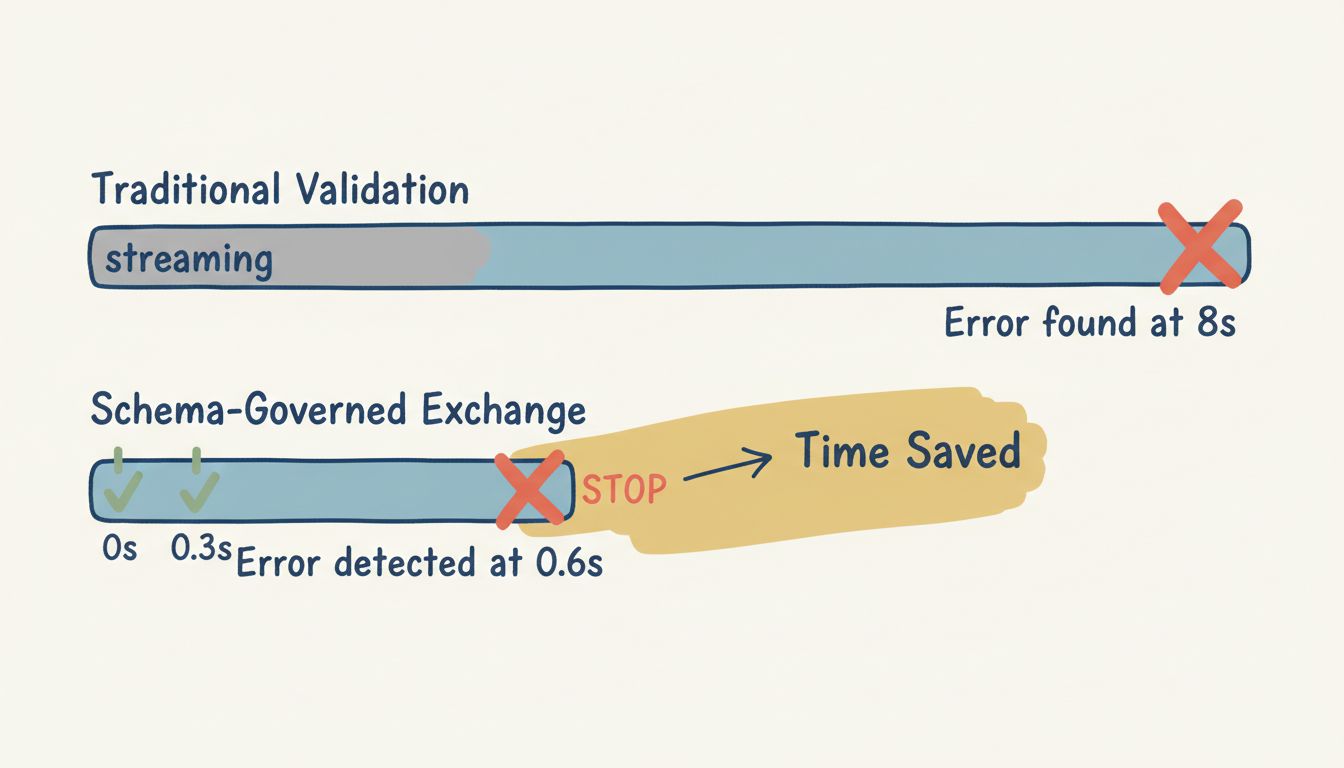
This is the Schema-Governed Exchange pattern. The streaming-patterns demo shows it in action.
The Problem with End-of-Stream Validation
Standard validation waits for the complete response:
const response = await streamLLM(prompt);
const data = JSON.parse(response);
const result = projectSetupSchema.safeParse(data);

if (!result.success) {
  // Now what? Start over?
  console.log(result.error);
}
Three problems with this approach:
Time waste. If the AI outputs "budget": "75k" in chunk two, chunks three through ten are probably wrong too. But you don't find out until everything arrives.
No progressive feedback. The UI shows nothing meaningful during streaming. Users see raw JSON accumulating with no indication of validity.
Binary outcome. Either the whole response is valid or it's not. You can't show partial success or highlight specific fields.
How Schema-Governed Exchange Works
The pattern streams three event types:
1. Schema event — Defines the contract upfront:
interface SchemaEvent {
  type: 'schema';
  data: {
    schemaId: string;
    version: string;
    desc: string;
    schema: Record<string, unknown>;
  };
}
2. Payload event — Streams the data progressively:
interface PayloadEvent {
  type: 'payload';
  data: {
    chunk: Record<string, unknown>;
    complete: boolean;
    chunkIndex: number;
  };
}
3. Schema error event — Reports validation failures with suggestions:
interface SchemaErrorEvent {
  type: 'schema_error';
  data: {
    field: string;
    error: string;
    suggestion?: string;
    severity: 'error' | 'warning' | 'info';
    code?: string;
  };
}
The key insight: payload events include the current state of the object (not just deltas). Each chunk is a complete snapshot of what's been parsed so far, enabling validation at every step.
The Zod Schema
The demo validates a project setup payload for StreamFlow PM:
import { z } from 'zod';

export const projectSetupSchema = z.object({
  projectName: z
    .string()
    .min(3, 'Project name must be at least 3 characters')
    .max(100, 'Project name must not exceed 100 characters'),

  budget: z
    .number()
    .min(1000, 'Budget must be at least $1,000')
    .max(10000000, 'Budget must not exceed $10,000,000'),

  teamIds: z
    .array(z.string().uuid('Team ID must be a valid UUID'))
    .min(1, 'At least one team must be assigned')
    .max(10, 'Cannot assign more than 10 teams'),

  deadline: z
    .string()
    .datetime('Deadline must be a valid ISO date string')
    .optional()
    .refine(
      (date) => !date || new Date(date) > new Date(),
      { message: 'Deadline must be in the future' }
    ),

  priority: z.enum(['low', 'medium', 'high', 'critical']).optional(),

  owner: z.object({
    userId: z.string().uuid(),
    email: z.string().email(),
  }).optional(),
});
Zod constraints enforce business rules: budget ranges, UUID formats, array lengths, future dates.
Progressive Validation with Partial Schemas
The trick to validating incomplete data: Zod's .partial() method.
export const partialProjectSetupSchema = projectSetupSchema.partial();A partial schema makes all fields optional. During streaming, you validate against the partial schema. When complete: true arrives, switch to the full schema to enforce required fields.
const validatePayload = (data: Record<string, unknown>, complete: boolean) => {
  const result = partialProjectSetupSchema.safeParse(data);

  if (result.success) {
    const hasRequiredFields = 'projectName' in data
      && 'budget' in data
      && 'teamIds' in data;

    const status = complete && hasRequiredFields ? 'valid' : 'partial';
    return { status, errors: [] };
  }

  // Convert Zod errors to our format with suggestions
  const errors = result.error.issues.map((issue) => ({
    field: issue.path.join('.'),
    message: issue.message,
    suggestion: generateSuggestion(issue),
    severity: 'error' as const,
    code: issue.code,
  }));

  return { status: 'invalid', errors };
};
This gives you real-time feedback on each field without false negatives for "missing" fields that simply haven't arrived yet.
The useSchemaValidation Hook
The React implementation wraps stream processing in a custom hook:
export function useSchemaValidation(options: MockStreamOptions = {}) {
  const [schema, setSchema] = useState<Record<string, unknown> | null>(null);
  const [payload, setPayload] = useState<Record<string, unknown>>({});
  const [isComplete, setIsComplete] = useState(false);
  const [isStreaming, setIsStreaming] = useState(false);
  const [validationResult, setValidationResult] = useState<ValidationResult>({
    status: 'pending',
    errors: [],
  });
  const [streamErrors, setStreamErrors] = useState<ValidationError[]>([]);

  const processEvent = useCallback((event: SchemaStreamEvent) => {
    switch (event.type) {
      case 'schema':
        setSchema(event.data.schema);
        break;

      case 'payload':
        setPayload(event.data.chunk);
        setIsComplete(event.data.complete);
        validatePayload(event.data.chunk, event.data.complete);
        break;

      case 'schema_error':
        handleSchemaError(event);
        break;
    }
  }, []);

  // ... stream lifecycle management

  return {
    schema,
    payload,
    isComplete,
    isStreaming,
    validationResult,
    streamErrors,
    startStream,
    stopStream,
    reset,
  };
}
Each event type triggers different state updates. The hook exposes everything the UI needs: current payload, validation status, errors from both Zod and the stream.
Auto-Fix Suggestions
When validation fails, generate actionable suggestions:
export function formatZodError(error: z.ZodIssue): {
  field: string;
  message: string;
  suggestion?: string;
} {
  const field = error.path.join('.');
  let suggestion: string | undefined;

  if (error.code === 'invalid_type') {
    if (error.expected === 'number') {
      suggestion = 'Expected a number value';
    }
    if (error.expected === 'array') {
      suggestion = 'Wrap value in array: [value]';
    }
  }

  if (error.message.includes('email')) {
    suggestion = 'Use format: user@example.com';
  }

  if (error.message.includes('UUID')) {
    suggestion = 'Use format: 550e8400-e29b-41d4-a716-446655440000';
  }

  return { field, message: error.message, suggestion };
}
The UI shows suggestions inline: "75k" → Convert to 75000. Users fix errors faster because they know exactly what format is expected.
Stream Fixtures: Testing Different Scenarios
The demo includes four pre-built scenarios:
Successful validation — Valid payload builds up chunk by chunk:
With errors — Multiple validation failures with suggestions:
export const errorValidationStream: SchemaStreamEvent[] = [
  { type: 'schema', data: { ... } },
  { type: 'payload', data: { chunk: { projectName: 'AI' }, complete: false, chunkIndex: 0 } },
  { type: 'schema_error', data: {
    field: 'projectName',
    error: 'Project name must be at least 3 characters',
    suggestion: 'Add 1 more character',
    severity: 'error'
  }},
  { type: 'payload', data: { chunk: { projectName: 'AI', budget: '75k' }, complete: false, chunkIndex: 1 } },
  { type: 'schema_error', data: {
    field: 'budget',
    error: 'Expected number, got string',
    suggestion: 'Convert "75k" to 75000',
    severity: 'error'
  }},
  // ... more errors
];
Corrected — Errors appear then get fixed mid-stream.
Minimal — Only required fields, validating immediately.
Validation Status Badge
The UI shows status at a glance:
export function useValidationStatus(
  validationResult: ValidationResult,
  totalErrors?: number
): { status: string; label: string; color: string; description: string } {
  const { status, errors } = validationResult;
  const errorCount = totalErrors ?? errors.length;

  switch (status) {
    case 'valid':
      return { status: 'valid', label: 'Valid', color: 'green', description: 'All validation checks passed' };
    case 'partial':
      return { status: 'partial', label: 'Partial', color: 'amber', description: 'Validation in progress' };
    case 'invalid':
      return { status: 'invalid', label: 'Invalid', color: 'red', description: `${errorCount} validation error${errorCount === 1 ? '' : 's'}` };
    default:
      return { status: 'pending', label: 'Pending', color: 'gray', description: 'Waiting for data' };
  }
}
Four states: pending → partial → valid or invalid. Users always know where they stand.
The Schema HUD
The left panel shows the expected schema structure. When an error occurs, the corresponding field highlights:
export function useSchemaHUD() {
  const [state, setState] = useState<SchemaHUDState>({
    visible: true,
    collapsed: false,
  });

  const highlightField = useCallback((field?: string) => {
    setState((prev) => ({ ...prev, highlightField: field }));
  }, []);

  return { state, toggle, toggleCollapse, highlightField };
}
Hover over an error in the payload viewer, and the corresponding schema field lights up. This creates a direct visual connection between "what went wrong" and "what was expected."
When to Use Schema-Governed Exchange
Use it when:
Extracting structured data from AI output (forms, entities, API responses)
Streaming long payloads where early validation saves time
Users need to see validation status during generation
Auto-fix suggestions improve the correction workflow
Skip it when:
Free-form text generation (no schema to validate)
Simple single-field responses
Schema is unstable and changes frequently
The pattern shines when you need guarantees about structure and catching errors early matters.
What You Get
Four key benefits:
Immediate error detection — Know about problems in 200ms, not 8 seconds
Progressive validation status —
pending→partial→validin the UIAuto-fix suggestions — Actionable hints for common errors
Schema transparency — Users see the contract and where violations occur
The UX improvement is significant. Users see data arriving with real-time validation status. Errors surface immediately with suggestions for fixing them.
Try It Yourself
The full implementation is live at streamingpatterns.com/patterns/schema-governed-exchange. Try the four scenarios: valid, with errors, corrected, and minimal.
The source code is on GitHub at vibeacademy/streaming-patterns. The implementation lives in src/patterns/schema-governed-exchange/—hooks, types, fixtures, and components.
If you want to go deeper on building AI-powered interfaces, I put together a free study guide covering the fundamentals. Get the AI Study Guide.