- Jan 27, 2026
See What AI Remembers - Multi-Turn Memory Timeline Pattern
- Teddy Kim
- 0 comments
Your AI assistant is helping you plan Q4. You mention the budget is $500k. Three turns later, you say it's been increased to $600k.
Does the AI remember the update? Did it catch the original budget? What else has it extracted from this conversation?
You have no idea. And that's the problem.
Most AI chat interfaces hide what the model "remembers." Users assume the AI tracks everything perfectly. When it misses something or references outdated information, trust breaks down. Users don't know what went wrong or how to fix it.
The Multi-Turn Memory Timeline pattern makes AI memory visible. Users see exactly what facts, decisions, tasks, and risks the AI has extracted. They can pin important memories or prune irrelevant ones. No more guessing. No more hidden context.
The Mental Model Problem
Traditional chat interfaces show messages in a linear thread. User says something, AI responds. The conversation scrolls. Users assume if they said it, the AI knows it.
But AI memory isn't just the raw conversation. Production AI systems extract structured information: facts to remember, decisions made, tasks identified, risks flagged. This extraction happens behind the scenes. Users never see it.
The problem: when the AI references "the budget" or "the deadline," users don't know if it's working from the right information. When it misses something important, they don't know why.
The mental model shift is this: memory isn't just conversation history. It's structured extraction that users should see and control.
The Multi-Turn Memory Timeline surfaces these extractions as visual artifacts. Users see what the AI has learned from the conversation, where each memory came from, and how it evolves over time.
How Memory Extraction Works
The AI extracts four types of memories from conversation:
Facts — Objective information like team size, budget, and dates. "Team size: 8 engineers" extracted from "we have a team of 8 engineers."
Decisions — Choices made during the conversation. "Priority #1: User authentication" extracted from "Focus on user authentication first."
Tasks — Action items identified. "Launch mobile app" extracted from "The goal is to launch our mobile app."
Risks — Potential issues flagged. "Tight timeline: 10 weeks until launch" inferred from the deadline.
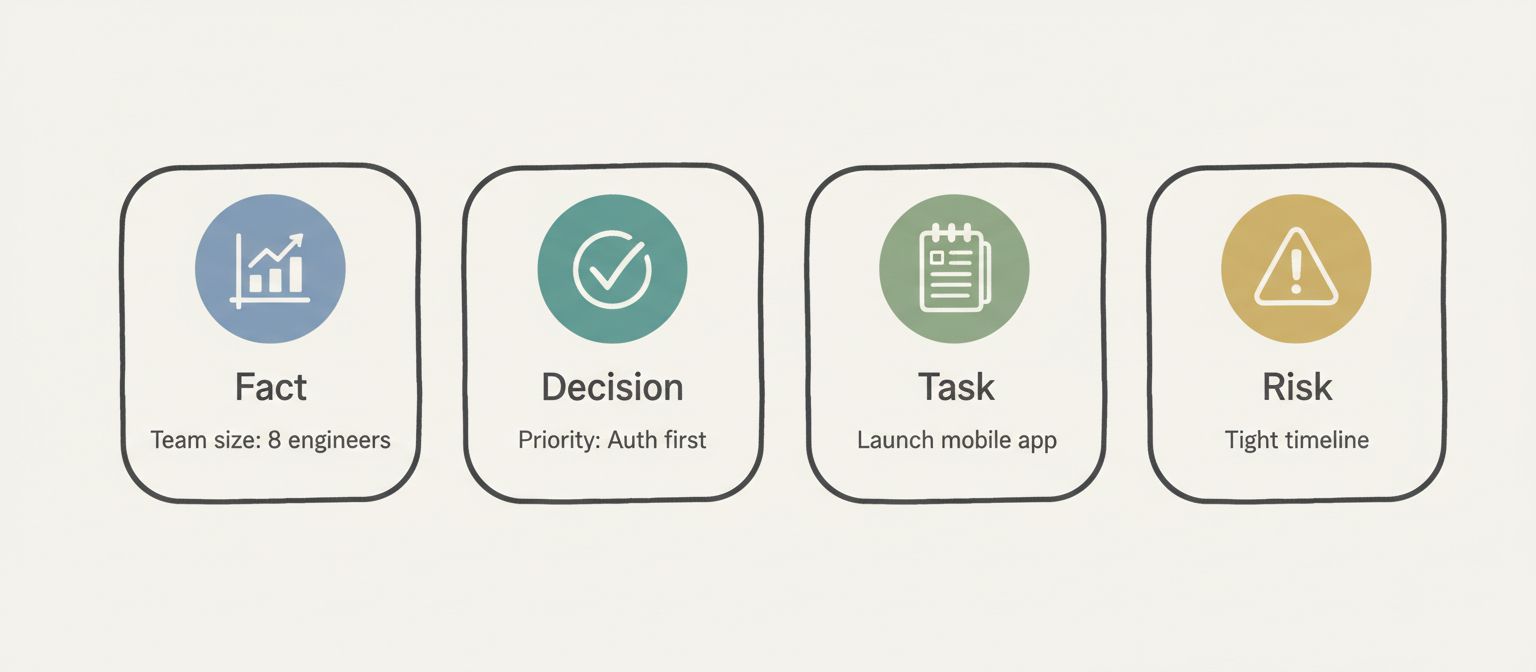
Each memory has a type, a summary, and provenance—the exact token excerpt that created it. This transparency lets users verify what the AI understood and correct misinterpretations.
Here's the data model:
export type MemoryType = 'fact' | 'decision' | 'task' | 'risk';

export interface Memory {
  id: string;
  memoryType: MemoryType;
  summary: string;
  tokenExcerpt: string;  // Provenance: where this came from
  timestamp: number;
  pinned: boolean;
  metadata?: {
    source?: 'user' | 'agent';
    confidence?: number;
  };
}
Each memory tracks its type, a human-readable summary, the exact conversation excerpt it was extracted from, when it was created, and whether the user has pinned it. The source field indicates whether the memory came from something the user said or something the agent inferred.
Memory Lifecycle Events
Memories aren't static. They're created, updated, and pruned as the conversation progresses.
memory.create — A new memory is extracted. User mentions the budget, a fact memory appears.
memory.update — Information changes. Budget increases from $500k to $600k, the existing fact memory updates to reflect the new value.
memory.prune — A memory becomes irrelevant. A risk about capacity concerns gets pruned when the team grows.
memory.pin — User marks a memory as important. Pinned memories persist and won't be auto-pruned.
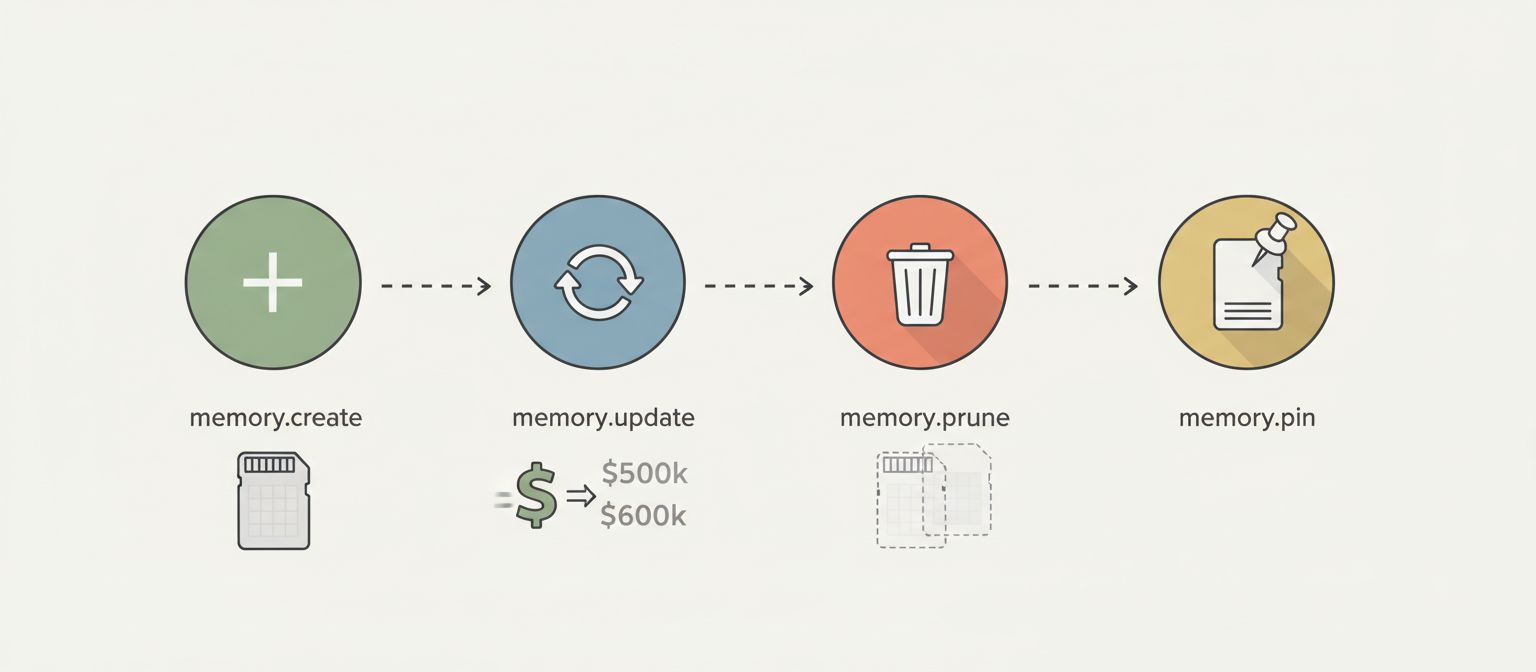
Here's how events flow through the stream:
// Memory creation
{
  type: 'memory.create',
  timestamp: 1699545606000,
  data: {
    id: 'mem-001',
    memoryType: 'fact',
    summary: 'Q4 budget: $500k',
    tokenExcerpt: '...and a budget of $500k...',
    metadata: { source: 'user', confidence: 1.0 }
  }
}

// Memory update (budget increased)
{
  type: 'memory.update',
  timestamp: 1699545646000,
  data: {
    id: 'mem-001',
    updates: {
      summary: 'Q4 budget: $600k (increased from $500k)',
      tokenExcerpt: '...budget approval for an additional $100k...'
    }
  }
}

// Memory pruned (risk resolved)
{
  type: 'memory.prune',
  timestamp: 1699545649000,
  data: {
    id: 'mem-009',
    reason: 'Superseded by increased team capacity'
  }
}
Updates preserve the original timestamp and pinned status while changing the summary. Prunes include a reason for logging and debugging.
Implementation: The useMemoryTimeline Hook
The React implementation manages memories as a Map for O(1) lookups:
function useMemoryTimeline(config: UseMemoryTimelineConfig) {
  const [memories, setMemories] = useState<Map<string, Memory>>(new Map());
  const [messages, setMessages] = useState<Message[]>([]);
  const [filters, setFiltersState] = useState<MemoryFilters>({
    types: [],
    searchQuery: '',
    pinnedOnly: false,
  });

  useEffect(() => {
    const stream = createMockMemoryStream(config);

    for await (const event of stream) {
      switch (event.type) {
        case 'memory.create':
          setMemories((prev) => {
            const newMemories = new Map(prev);
            newMemories.set(event.data.id, {
              id: event.data.id,
              memoryType: event.data.memoryType,
              summary: event.data.summary,
              tokenExcerpt: event.data.tokenExcerpt,
              timestamp: event.timestamp,
              pinned: false,
              metadata: event.data.metadata,
            });
            return newMemories;
          });
          break;

        case 'memory.update':
          setMemories((prev) => {
            const newMemories = new Map(prev);
            const existing = newMemories.get(event.data.id);
            if (existing) {
              newMemories.set(event.data.id, {
                ...existing,
                ...event.data.updates,
                timestamp: existing.timestamp,  // Preserve original
                pinned: existing.pinned,        // Preserve pin status
              });
            }
            return newMemories;
          });
          break;

        case 'memory.prune':
          setMemories((prev) => {
            const newMemories = new Map(prev);
            newMemories.delete(event.data.id);
            return newMemories;
          });
          break;

        case 'message':
          setMessages((prev) => [...prev, event.data]);
          break;
      }
    }
  }, [config]);

  return { memories, messages, filters, actions };
}
Using Map instead of an array is intentional. When processing update and prune events, you need fast lookups by ID. Array.find() is O(n). Map.get() is O(1). With dozens of memories across a long conversation, this matters.
The Memory Card Component
Each memory renders as a card with type icon, summary, and user controls:
The provenance tooltip is critical. When users hover over a memory, they see the exact conversation excerpt that created it. This builds trust—users can verify the AI understood correctly.
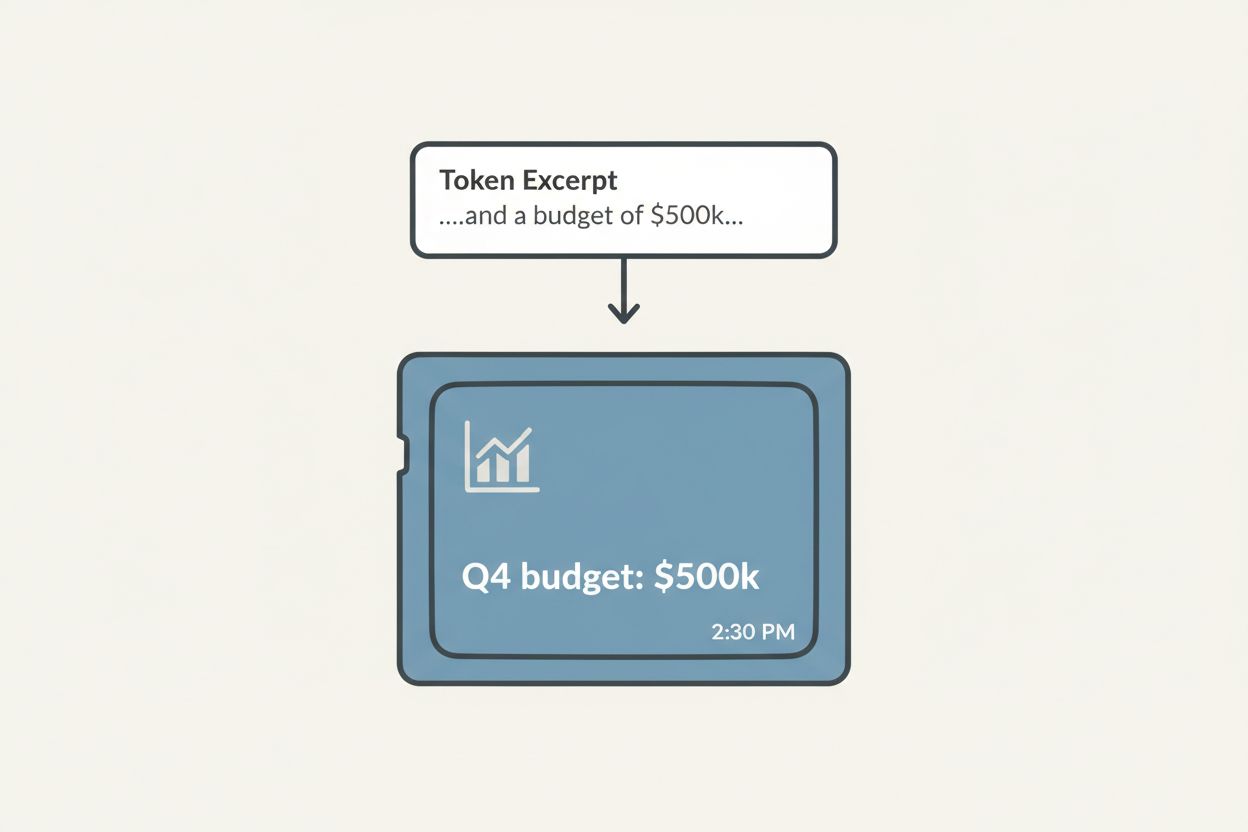
Visual distinction by type uses color coding: blue for facts, green for decisions, amber for tasks, red for risks. Users quickly scan the timeline and see what kinds of information the AI has extracted.
User Controls: Pin and Prune
Two actions give users control over AI memory:
Pin — Marks a memory as important. Pinned memories won't be auto-pruned when context management kicks in. The pin button toggles, showing a filled pin icon when active.
Prune — Manually removes a memory. Users can delete irrelevant or incorrect extractions. Pruned memories disappear immediately.
const togglePin = useCallback((memoryId: string) => {
  setMemories((prev) => {
    const newMemories = new Map(prev);
    const memory = newMemories.get(memoryId);

    if (memory) {
      newMemories.set(memoryId, {
        ...memory,
        pinned: !memory.pinned,
      });
    }

    return newMemories;
  });
}, []);

const pruneMemory = useCallback((memoryId: string, reason: string) => {
  setMemories((prev) => {
    const newMemories = new Map(prev);
    newMemories.delete(memoryId);
    return newMemories;
  });
}, []);
These are optimistic updates—state changes immediately without waiting for server confirmation. In production, you'd also emit events to the server for logging and potential rollback.
Filtering Memories
With many memories across a long conversation, filtering becomes essential:
const filteredMemories = useMemo<Memory[]>(() => {
  let result = Array.from(memories.values());

  // Filter by type
  if (filters.types.length > 0) {
    result = result.filter((mem) => filters.types.includes(mem.memoryType));
  }

  // Filter by pinned status
  if (filters.pinnedOnly) {
    result = result.filter((mem) => mem.pinned);
  }

  // Filter by search query
  if (filters.searchQuery.trim()) {
    const query = filters.searchQuery.toLowerCase();
    result = result.filter(
      (mem) =>
        mem.summary.toLowerCase().includes(query) ||
        mem.tokenExcerpt.toLowerCase().includes(query)
    );
  }

  // Sort by timestamp (newest first)
  result.sort((a, b) => b.timestamp - a.timestamp);

  return result;
}, [memories, filters]);
Users can filter by type (show only decisions), by pinned status (show only what I marked important), or by search query (find memories mentioning "budget"). All filtering is client-side using useMemo for performance.
Horizontal Timeline Layout
The memory timeline renders as a horizontal scrollable row:
function MemoryTimeline({ memories, onTogglePin, onPrune }: Props) {
  if (memories.length === 0) {
    return (
      <div className="timeline empty">
        No memories yet. Start a conversation to see the agent build its memory.
      </div>
    );
  }

  return (
    <div className="timeline">
      <div className="scroll-container">
        {memories.map((memory) => (
          <MemoryCard
            key={memory.id}
            memory={memory}
            onTogglePin={onTogglePin}
            onPrune={onPrune}
          />
        ))}
      </div>
    </div>
  );
}
Horizontal layout works better than vertical for memory timelines. Users scan left-to-right to see the progression. Newest memories appear on the right. The timeline can be sticky-positioned so it's always visible while scrolling the chat.
Production Considerations
Memory extraction quality. The pattern's value depends on the AI extracting useful, accurate memories. Prompt engineering matters. Tell the model to emit memory events when it encounters facts, decisions, tasks, or risks.
Provenance accuracy. The tokenExcerpt should be the actual text that triggered the memory. Don't paraphrase. Users need to verify against the original.
TTL for auto-pruning. Memories can have a time-to-live. Old facts about team size from six months ago might auto-prune. Pinned memories override TTL.
Confidence scores. Some memories are certain (user stated the budget). Others are inferred (agent flagged a risk). Show confidence when it's not 100%.
When to Use Memory Timelines
Use the Multi-Turn Memory Timeline pattern when:
Multi-turn planning sessions — Users build context over many turns
Research and analysis — AI accumulates findings users need to track
Project management — Facts, decisions, and tasks are explicit artifacts
Customer support — Reference history matters and can be corrected
Don't use it when:
Simple Q&A — Single-turn interactions don't build memory
Magic is the goal — Some users prefer invisible AI, not transparent mechanics
Casual chat — Social conversation doesn't need structured extraction
Technical overhead isn't worth it — Short conversations don't benefit
The pattern works best when users actively reference and correct AI memory.
What You Get
Five key benefits:
Visible extraction — Users see exactly what the AI learned from conversation
Provenance transparency — Hover to see the source of any memory
User control — Pin important memories, prune irrelevant ones
Type categorization — Facts, decisions, tasks, and risks are visually distinct
Trust through transparency — No more wondering what the AI knows
The UX difference is dramatic. Instead of hoping the AI caught the budget update, users see the fact card change from "$500k" to "$600k (increased from $500k)." They know the AI knows.
Try It Yourself
The full implementation is live at streamingpatterns.com/patterns/multi-turn-memory. The demo shows a Q4 planning conversation where the agent extracts facts, decisions, tasks, and risks in real-time.
The source code is on GitHub at vibeacademy/streaming-patterns. Clone it, run it locally, see how memory events stream alongside chat messages.
If this shift from hidden memory to visible, controllable extraction clicked for you, the streaming patterns site covers six more patterns—streaming tables, agent interruptions, reasoning traces, and others. Each one tackles a different UX problem that traditional request-response architectures can't solve cleanly.
If you want to go deeper on AI UX patterns and understanding how to build transparent AI interfaces, I put together a free study guide covering the fundamentals. Get the AI Study Guide.